From passbook to phone: how we've tracked our money in Singapore
The passbook, a Notepad file, an Excel sheet, a money app. Brandon from Sum walks through how Singapore tracked its money, and what each step still asked of you.

A Sunday a couple of weeks ago, after dinner at my parents' place, my mum came out of my old room holding a shoebox. She'd been clearing the drawer where my school certificates live (and, yes, my GTA 5 disc). "This one yours. Keep or throw?"
Inside was my first passbook. A small savings account she opened for me when I was in primary school. Almost every line was in February: CNY red packet money, which went straight to the bank with my mum before I could think of anything to spend it on. A few lines of interest, a few cents each. And then, on the last page, a gap of nearly two years where nobody had updated it, followed by one long, very satisfying row of interest catching up.
"Last time must queue at the machine," my mum said. "Then you know how much you have."
I kept it. I'm Brandon, I'm on the finance team at Sum, and that little book made me think about how many ways I've tracked money since. A text file. A spreadsheet updated once a year, the night before CNY. An app I gave up on after a few weeks. Each was easier than the one before, and each still asked me to do one thing myself: write every spend down.
Our latest carousel walks through that history, one tool at a time. Here's the long version, with the arithmetic from each slide.
Remember updating your passbook?
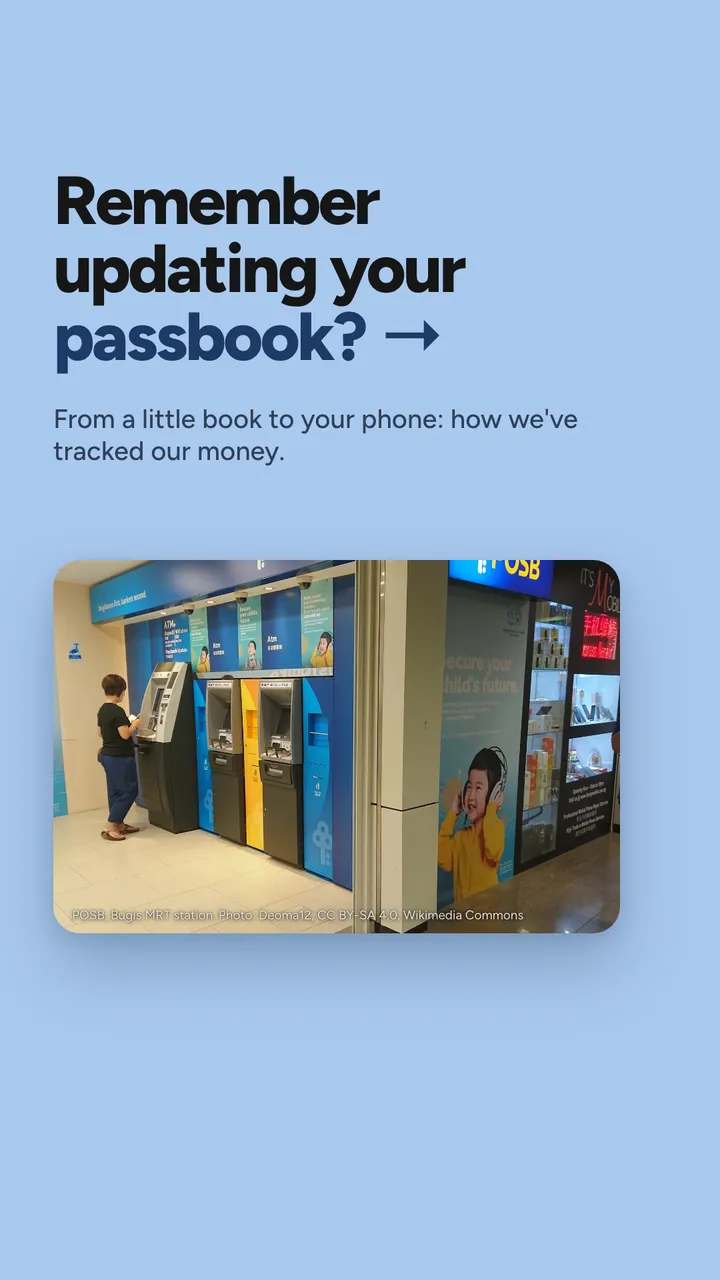
The photo on the cover is a row of ATMs at Bugis MRT station, the kind many of us queued at with a passbook in hand. For a long time, that queue was what "checking your balance" meant in Singapore.
It's worth looking back for one reason. Every way of tracking money is a trade between two things: how much work it takes, and how up to date it is. The passbook was low work but often out of date. Spreadsheets were up to date only if you did the work. The story of the next few slides is that trade slowly getting better.
What this means for you
If you've ever tried to track your money and stopped, you're in good company. Most of the tools below asked for a little effort every day, and a little effort every day is exactly what busy weeks squeeze out. That says more about the tools than about you.
First, the passbook
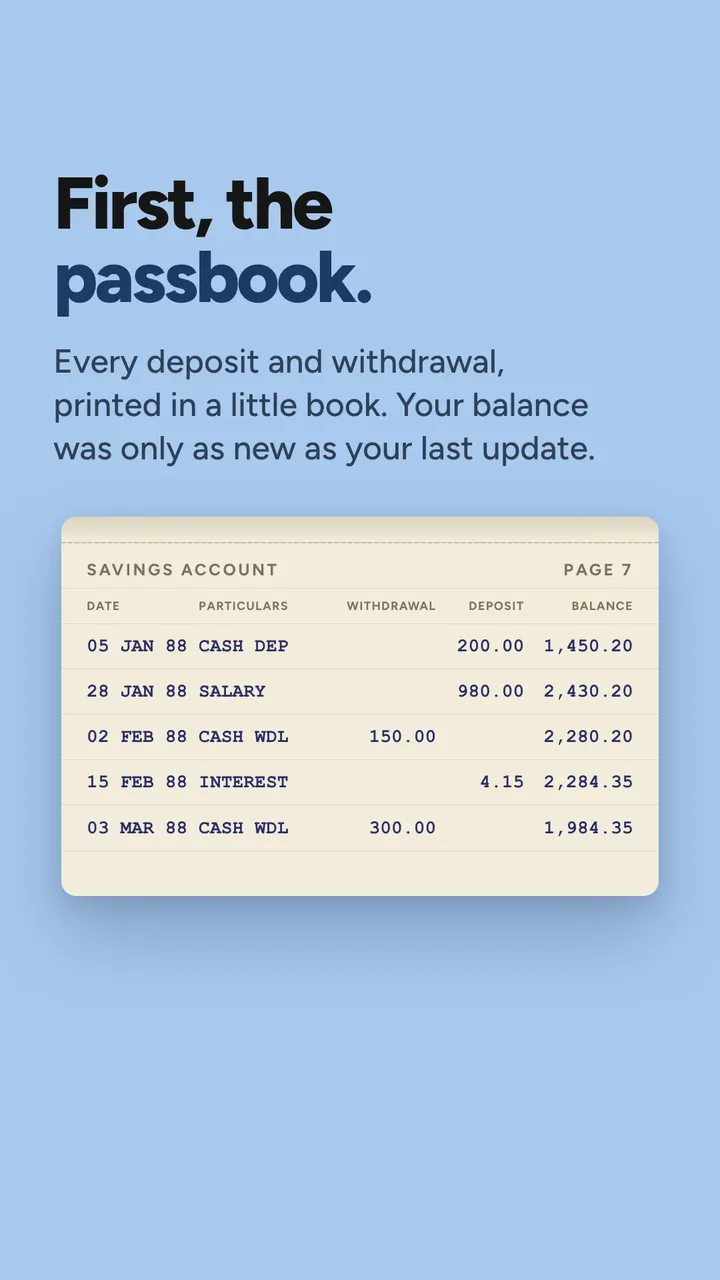
A passbook is a printed record of one savings account. Each line is a transaction: the date, what it was (a cash deposit, a salary credit, a withdrawal, interest), the amount, and the balance after it. The bank kept the real record. The passbook was your copy, and it only knew what had been printed into it.
A worked example
The page on the slide is a drawn example from 1988, with sample figures. Let's follow it line by line:
| Date | What | Amount | Balance |
|---|---|---|---|
| 05 Jan | Cash deposit | +$200.00 | $1,450.20 |
| 28 Jan | Salary | +$980.00 | $2,430.20 |
| 02 Feb | Cash withdrawal | −$150.00 | $2,280.20 |
| 15 Feb | Interest | +$4.15 | $2,284.35 |
| 03 Mar | Cash withdrawal | −$300.00 | $1,984.35 |
Each balance is the one before, plus or minus the new line. $2,430.20 minus $150 is $2,280.20. Add $4.15 of interest and it's $2,284.35. Take out $300 and you're at $1,984.35.
Here's the catch the slide points at. Say this person withdrew another $200 on 20 March and didn't update the book. The last line would still say $1,984.35, while the real balance was $1,784.35. The passbook wasn't wrong. It was just old.
What this means for you
The passbook's problem hasn't gone away, it's just moved. Any balance you check once a month is a passbook balance: true on the day, and quietly getting older. When you look at a number, it's worth asking how new it is.
Then, Notepad
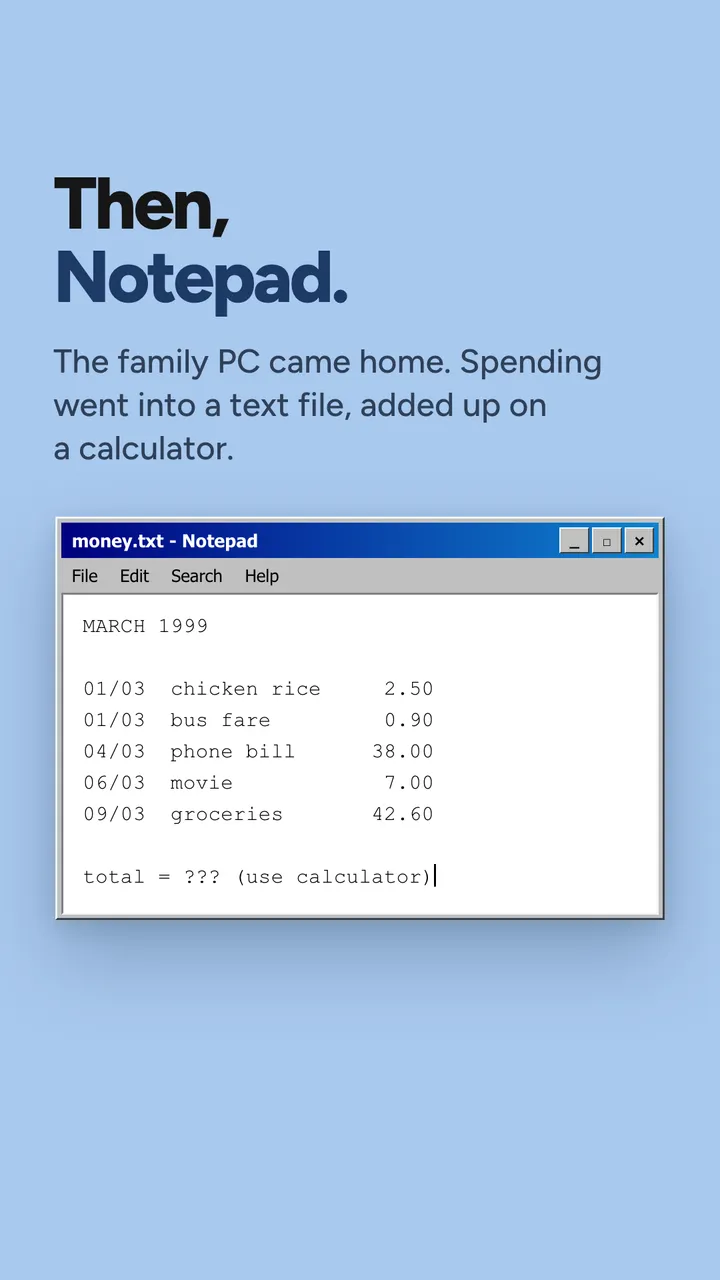
When the family PC arrived, a lot of households started keeping money notes on it. Not in anything fancy: a plain text file, one spend per line. The slide's example is from March 1999.
The nice thing about a text file is that it records what the passbook never could: what the money was spent on. Not "cash withdrawal", but chicken rice, bus fare, the phone bill.
A worked example
The file on the slide has five lines:
- chicken rice, $2.50
- bus fare, $0.90
- phone bill, $38.00
- movie, $7.00
- groceries, $42.60
The last line of the file says it all: "total = ??? (use calculator)". So, with a calculator: $2.50 plus $0.90 is $3.40. Plus $38 is $41.40. Plus $7 is $48.40. Plus $42.60 is $91.00.
Now imagine that across a whole month, with thirty or forty lines, and a calculator slip somewhere in the middle. The file could tell you where the money went, but adding it up was its own little job.
What this means for you
Writing down where money goes is still the most useful habit in personal finance. Knowing that $38 of $91 went on one bill tells you more than any balance does. The question is only who does the writing.
Then, Excel on Windows XP
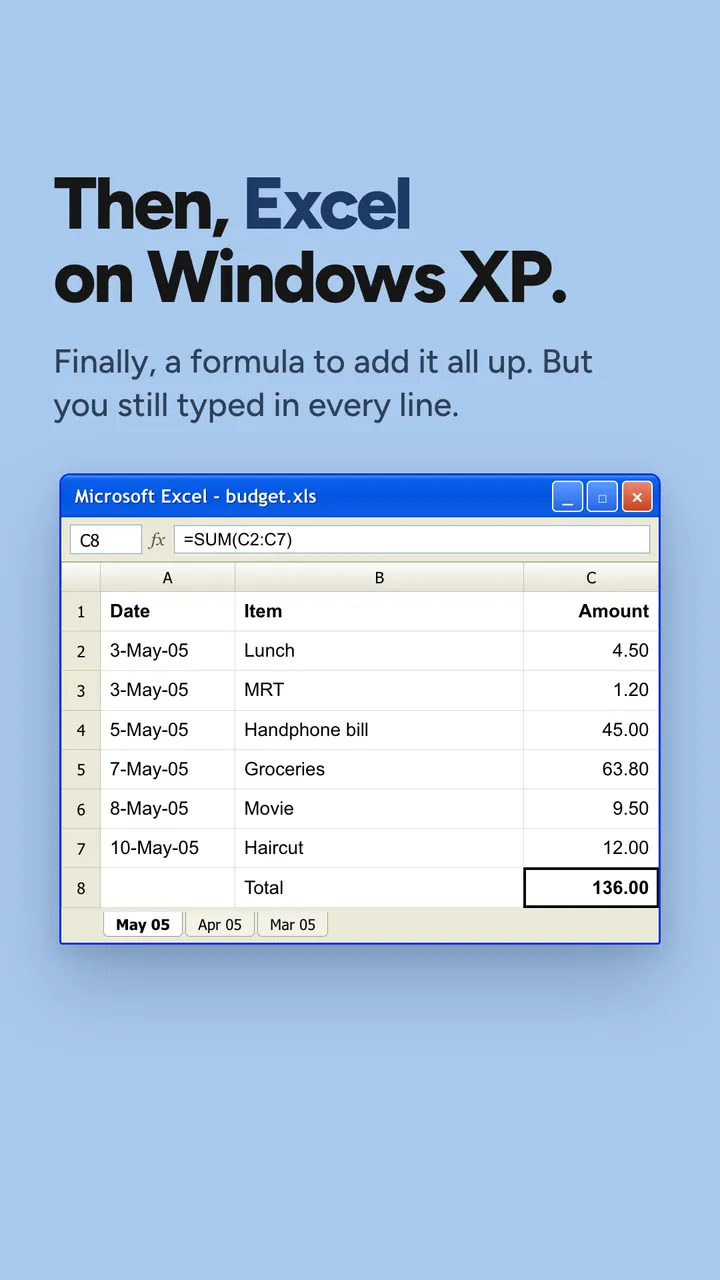
The spreadsheet fixed the calculator problem. Type each spend into a row, put a formula at the bottom, and the total updates itself. The slide's example is a budget sheet from May 2005, with a tab for each month.
A worked example
The formula on the slide is =SUM(C2:C7): add up everything in column C, from row 2 to row 7. Those rows are lunch $4.50, MRT $1.20, handphone bill $45.00, groceries $63.80, a movie $9.50 and a haircut $12.00. So the sheet works out $4.50 + $1.20 + $45.00 + $63.80 + $9.50 + $12.00 = $136.00, and nobody needs a calculator.
But look at what the formula doesn't do. It adds whatever is in column C. If you forgot two lunches and a taxi, the total is still neatly bold, still exactly $136.00, and still wrong.
Here's a rough sum of my own. When I first imported a full month of my main card, it had 63 lines. If typing each one with a category takes about 30 seconds, that's 63 × 30 = 1,890 seconds, a little over half an hour a month, for one card, every month, forever. No wonder the sheet waited for CNY.
What this means for you
If you keep a spreadsheet and it works, keep it. If it keeps falling behind, it's worth noticing that the part that falls behind is the input, not you. A tool that removes the typing will do more than a better template.
Then, money apps
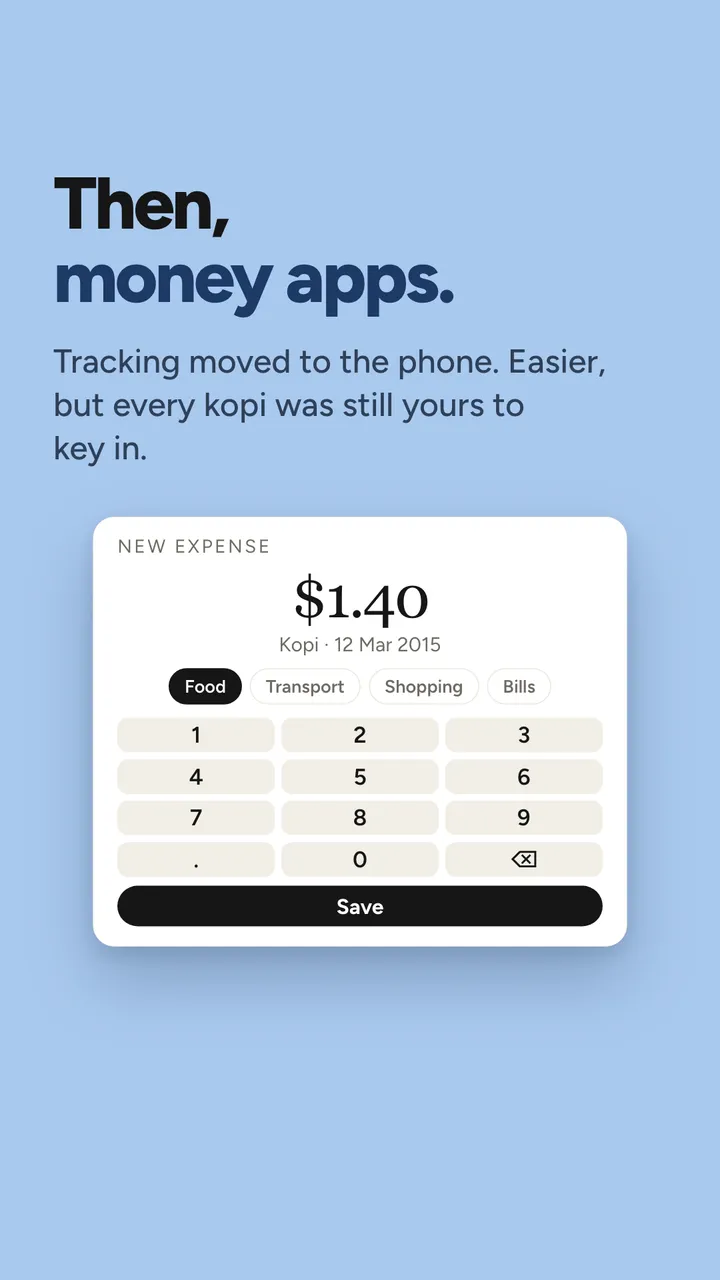
Smartphones put the spreadsheet in your pocket. A money app let you log a spend right at the counter: tap the amount, pick a category, save. The slide's example is a $1.40 kopi on 12 March 2015, filed under Food.
This was a real improvement. You no longer had to remember a week of spending on Sunday night. But every entry still started with you.
A worked example
Say Jun Wei is 29. This is made up, but it's a pretty ordinary picture. He buys a $1.40 kopi on the way to work and another after lunch, on about 22 working days a month. That's 2 × 22 = 44 entries a month for kopi alone, adding up to 44 × $1.40 = $61.60. Then add lunches, MRT rides, groceries, the online orders and the bills.
Miss a few days and the app doesn't know. Its totals look as confident as the spreadsheet's, and they're just as incomplete. That's usually when people stop opening it.
What this means for you
If you've tried a money app and drifted away, a common reason is the gap: a week of missed entries makes the numbers feel pointless, so you stop. It isn't a lack of discipline. It's a tool that needed you every single day.
Now, you don't even log it
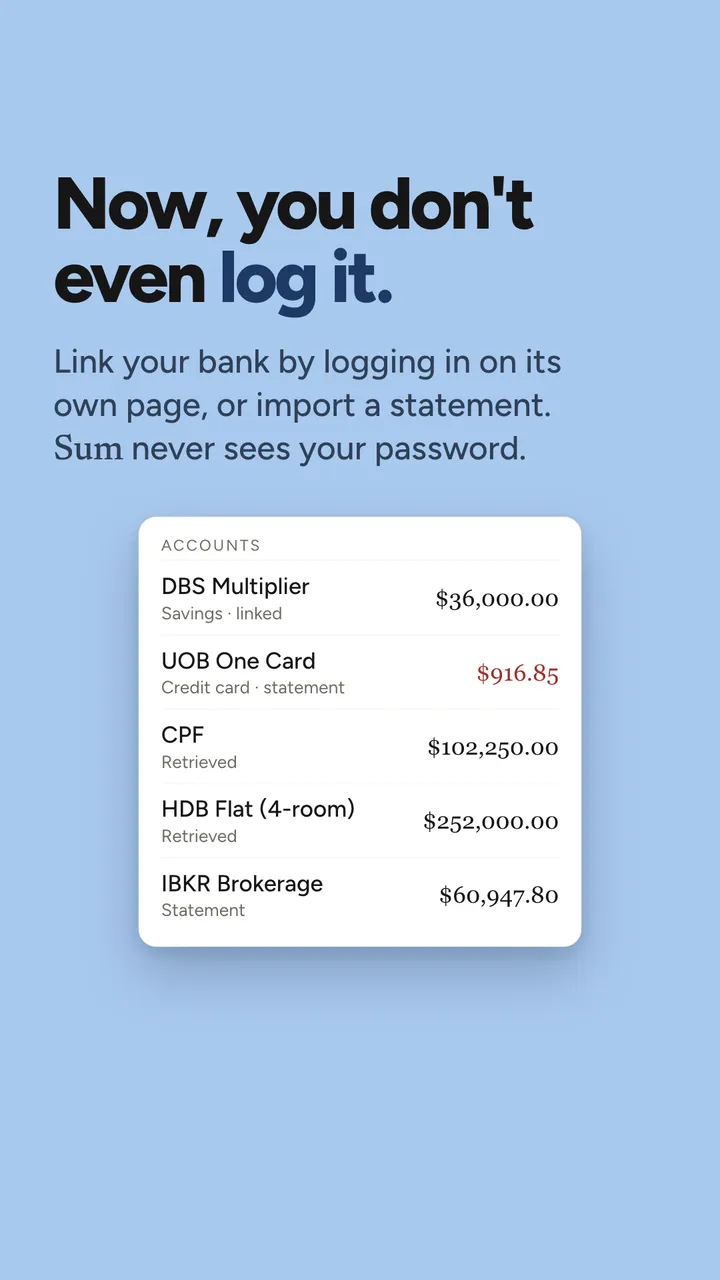
This is the step that finally takes the typing away. In Sum, there are two ways for your spending to come in:
- Link a bank. You log in on the bank's own page, not in Sum, so Sum never sees your bank password. After that, the transactions come in by themselves. Sum is read-only: it can see your accounts, but it can't move money.
- Import a statement. Not every bank or card can be linked, so for the rest you import the monthly statement, and Sum reads it and sorts every line into a category.
The accounts list on the slide (sample data) shows both side by side: a savings account marked "linked", a credit card and a brokerage account marked "statement", and the flat and CPF alongside them.
A worked example
Go back to my 63-line card month. Typed by hand, it was about half an hour. Imported as a statement, it's one file, and the 63 lines arrive already sorted. The time I used to spend typing now goes on the part that actually helps: looking at the three biggest categories and asking whether they're what I expected.
On the Free plan you can link up to 2 banks and import statements and screenshots. Essential adds unlimited bank links.
What this means for you
When you're choosing how to track, look at the input first. If it depends on you entering every line, plan for the weeks you won't. If it can come in by itself, through a link or a statement, the gaps mostly disappear.
Your CPF, without typing a number
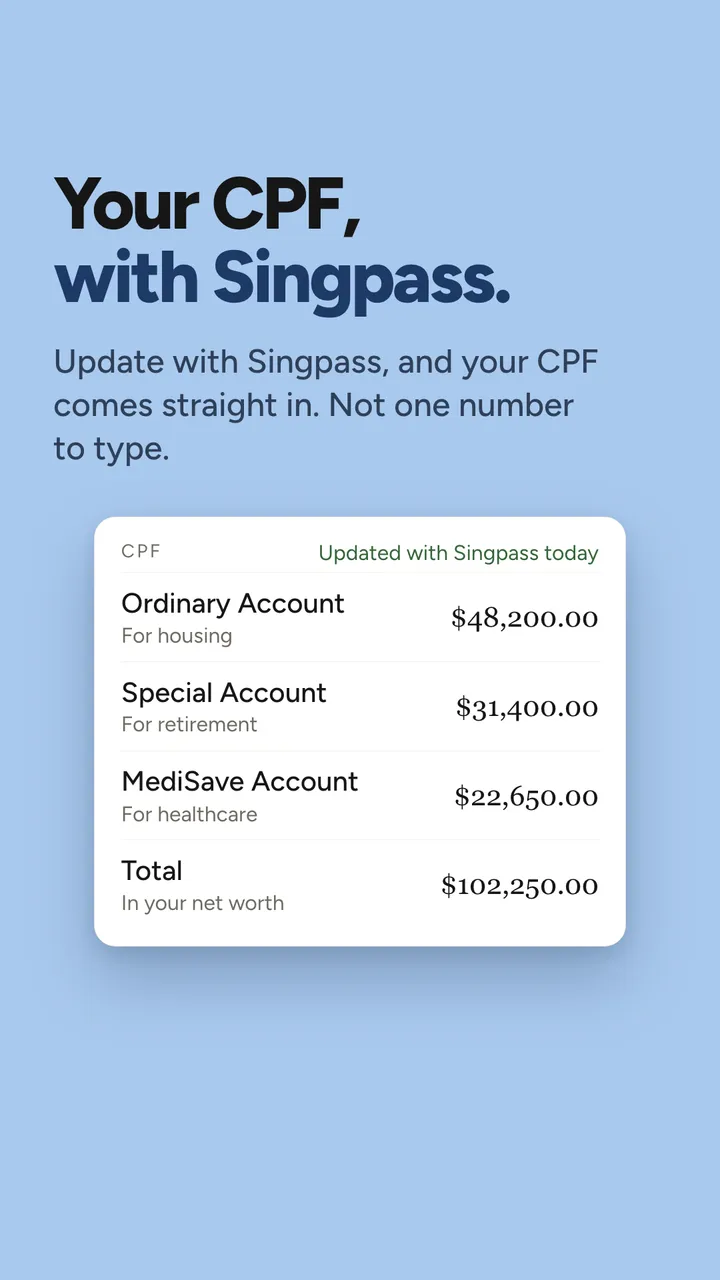
CPF is, for most of us, one of the biggest pots of money we have, and it's the one the old tools ignored completely. No passbook line for it, no spreadsheet column most people kept up.
On the slide (sample data), the CPF card shows the three accounts and what each is for: the Ordinary Account (OA) for housing, the Special Account (SA) for retirement and the MediSave Account for healthcare. The total is $48,200 + $31,400 + $22,650 = $102,250, and it goes straight into the net worth. On Essential, Sum pulls your CPF details in automatically when you update, so there isn't one number to type. On Free, you can keep a CPF summary and see your progress towards the retirement sums.
What this means for you
If you've never counted your CPF as part of your money, try adding it up once. I didn't for years, and the first time I did, my net worth was higher than I expected. It's set aside for specific uses, but it's yours.
It's never been easier to track your money
Put the slides side by side and the pattern is clear. The passbook was out of date. The text file needed a calculator. The spreadsheet needed typing. The app needed typing, every day. Each step made one part easier, and the last step takes the typing away.
What hasn't changed is why people tracked in the first place. My mum queued at the machine because she wanted to know how much she had. That's still the whole point. The tools are just catching up with it.
If you only remember three things
- A balance is only as new as its last update. That was true of the passbook, and it's true of any number you check once a month.
- The input is the hard part, not the maths. A formula can add anything. What makes tracking stick is not having to type every line.
- Your money is more than your bank balance. Cards, CPF and your flat belong in the picture too.
How I keep track of this
These days the passbook lives in a shoebox, and my tracking takes about ten minutes a month. On the 1st, with a kopi, I open Sum, import last month's card statements, and check the three biggest categories, my groceries budget, my goals (the Japan trip my mum keeps asking about) and the net worth line. CPF sits in the same picture, next to the joint HDB loan, so the number at the top is the whole number, not just what's in the bank.
And when an auntie asks at CNY how much I have, I finally know, and it is today's number, not last year's.
If you have an old passbook, a Notepad file or a spreadsheet tab you still remember, I'd love to hear about it. Write to me at [email protected].
Talk soon, Brandon
Questions people ask
Why did people update their passbooks?
A passbook only showed the transactions printed in it. Until you put it into the update machine, the balance on the last line was the balance on the day of your last update, not today's.
Is a spreadsheet still a good way to track spending?
A spreadsheet adds up whatever you type in, so its totals are only as complete as your typing. It works for people who keep it up every week. The hard part is entering every line, not the formula.
Do I have to type in my spending to track it in Sum?
No. You can link a bank by logging in on the bank's own page, or import a statement, and the spending comes in by itself. Sum never sees your bank password.

Sum is launching in Singapore soon.
Your banks, cards, CPF and HDB flat, added up into one net worth. Statements sorted, card caps tracked, bills remembered.
Brandon · Finance team, Sum
Brandon is on Sum's finance team in Singapore. Brandon reads the CPF Board, IRAS and MAS updates so you don't have to, and turns our carousels into the longer version. Questions, corrections or something to share? Email Brandon at [email protected].
Got something interesting to share?
A money story, a question, something we got wrong, or a tip other Singaporeans should hear. Reach out to me at [email protected], or leave your email and I'll write to you.
Any app screens shown use sample data, not a real person's. Sum is free to start; some features need a paid plan.