What is Sum? The money app that knows what CPF is
Budgets, goals, bill reminders, Insights and every statement sorted, in one net worth. Brandon from Sum's finance team walks through the app, slide by slide.

Every Chinese New Year, somewhere between the second pineapple tart and the third round of "so, when are you getting married?", one of my aunties asks the other question. "Brandon, you work in finance, right? So how much do you have already?"
And every year I give the same answer: a laugh and "enough lah". Because the honest answer was that I didn't know. Not roughly, not exactly. My money was in four banking apps, one CPF login, a brokerage account I opened during a bored weekend, two credit cards and a spreadsheet that I updated, you guessed it, once a year, the night before CNY, so I could feel organised for exactly one evening.
I'm Brandon, I'm on the finance team at Sum. We post a carousel on TikTok and Instagram most days, and a slide fits about twelve words, so this blog is where I write the long version.
This one answers the question we get more than any other: so what exactly is Sum? The carousel puts it as five jobs in one app. I'll go through them one slide at a time.
A money app that understands Singapore
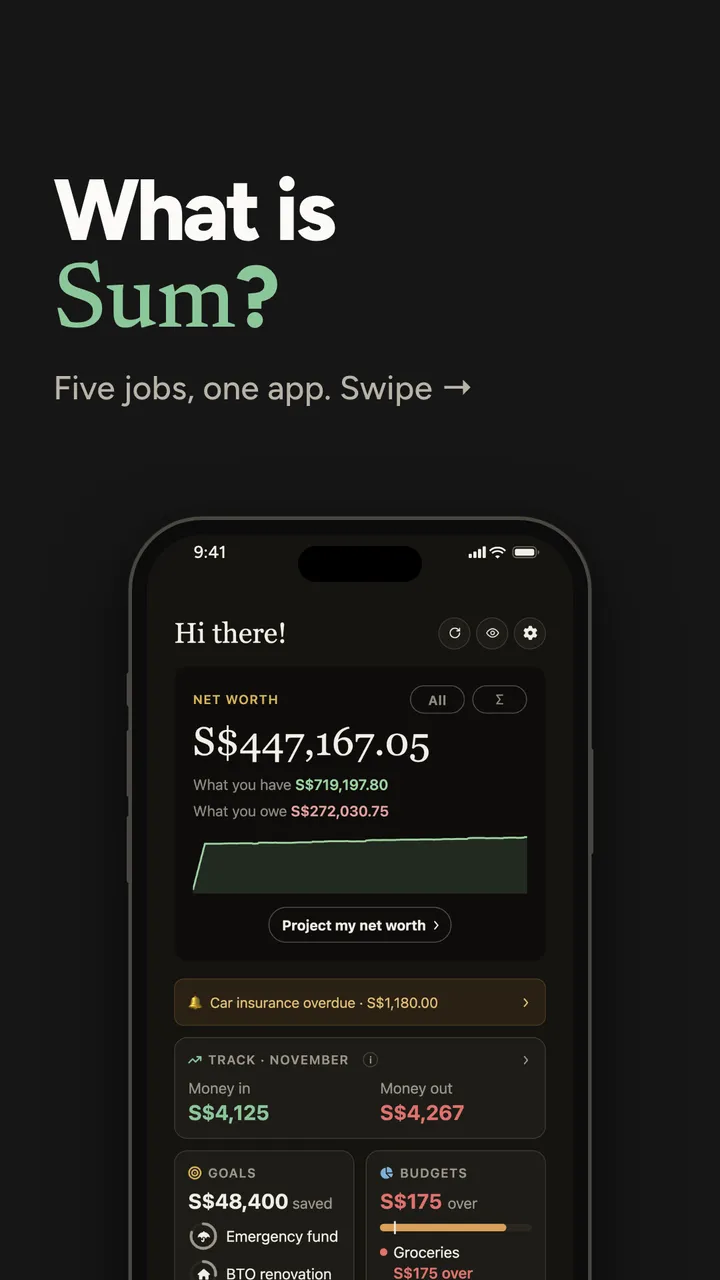
Sum is a personal finance app built for Singapore. It takes everything you own and everything you owe, across every bank, every card, your CPF and your HDB flat, and adds it up into one number: your net worth. That's the number at the top of the Home screen on the cover. The five jobs in the rest of the carousel all exist to keep that one number honest and up to date.
I've tried a lot of money apps over the years. Most were built for somewhere else. Ask them about your Ordinary Account and they look at you blankly. So the money most of us in Singapore actually have, CPF and property, simply doesn't exist in them, and the number they show you isn't your number.
Your net worth, and why your flat belongs in it
"Net worth" sounds like something rich people say at dinner parties. It isn't. It's just what you have, minus what you owe. Savings, CPF, investments and your home's value on one side. Your home loan, card balances and any other loans on the other.
Here's why the flat matters so much. Every quarter SingStat publishes the Household Sector Balance Sheet, a snapshot of what all Singapore households own and owe. In the release for the second quarter of 2026, residential property made up about 42% of household assets. For every $100 households own, about $42 is the home. If your money app leaves out your flat and your CPF, it's leaving out most of your money.
A worked example
Let me make it concrete with an example person. Say Wei Ling is 34. This is made up, but it's a pretty ordinary picture:
| What she has | What she owes | ||
|---|---|---|---|
| Savings across two banks | $28,000 | HDB loan left | $310,000 |
| CPF (OA, SA and MediSave) | $75,000 | Card balances this month | $1,200 |
| A 4-room flat, est. value | $520,000 | ||
| Total | $623,000 | Total | $311,200 |
Her net worth is $623,000 minus $311,200, which is $311,800.
Now look at what most apps would show her: her two bank balances, $28,000. That's less than a tenth of the real picture. If she only ever saw the $28,000, she might feel like she's getting nowhere, while every month her loan shrinks a little and her CPF quietly grows.
Why the line goes up and down
Under the number on the Home screen there's a line: your net worth month by month. It won't be smooth. A bonus month goes up; the month your Integrated Shield premium is due goes down. Watch the direction over a year, not any one month.
If you want a rough figure for your flat, our free HDB resale value calculator estimates it from recent resales on your street.
What this means for you
If you've ever tried a budgeting app and given up, it may not have been you. It may have been an app that only saw a small slice of your money. Before you judge yourself for "not being good with money", check whether the tool you used could even see your whole picture.
Job one: your budget tracker
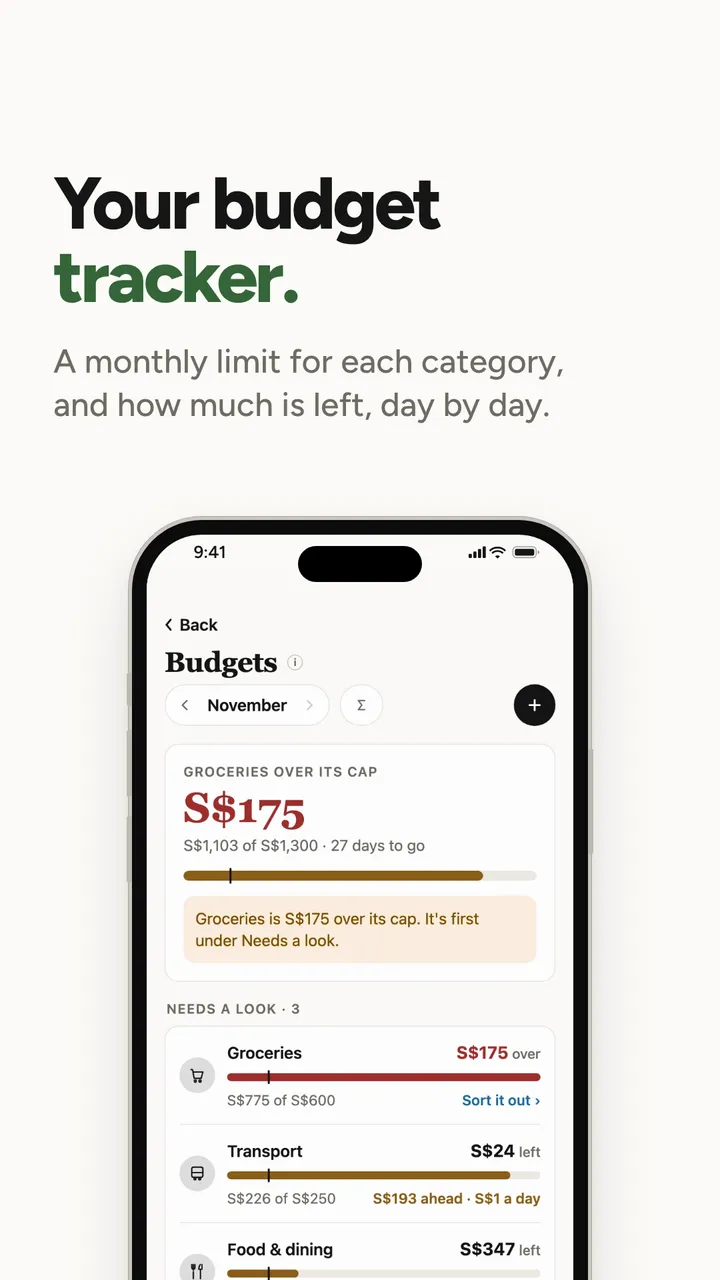
A budget in Sum is a monthly limit for a category you choose: groceries, transport, food and dining, whatever you spend most on. As your spending comes in and gets sorted, Sum counts each category against its limit and shows what's left for the rest of the month.
Look at the screen on the slide (sample data). Groceries had a $600 limit and $775 has gone on it, so it's $175 over: $775 minus $600. Transport has $24 left of $250, with 27 days to go, which is why it says about $1 a day: $24 divided by 27 is 89 cents, rounded up. Food and dining has $347 left, which works out to about $13 a day.
That "a day" figure is my favourite bit, honestly. "$347 left" doesn't tell you much on the 4th of the month. "$13 a day" tells you whether tonight's dinner fits.
Why a limit per category and not one total? One total hides where the money goes: you can be under it while one category quietly drifts, because another had a light month.
The screen also shows what isn't covered: $1,214 spent with no budget, on shopping and entertainment. That line is there so the money outside your budgets doesn't disappear from view.
I found this out about my own spending standing on a train platform. I'd have told you dining was my biggest category. Since we moved into the flat, it's groceries. So groceries was the first budget I set, and the number I picked was last month's real figure, not the figure I wished it was.
What this means for you
- Start with two or three categories, the ones you spend most on. You can add more later.
- Set each limit from last month's actual number. A limit you break every month on the 15th stops meaning anything.
Budgets are on the free plan.
Job two: your goals coach
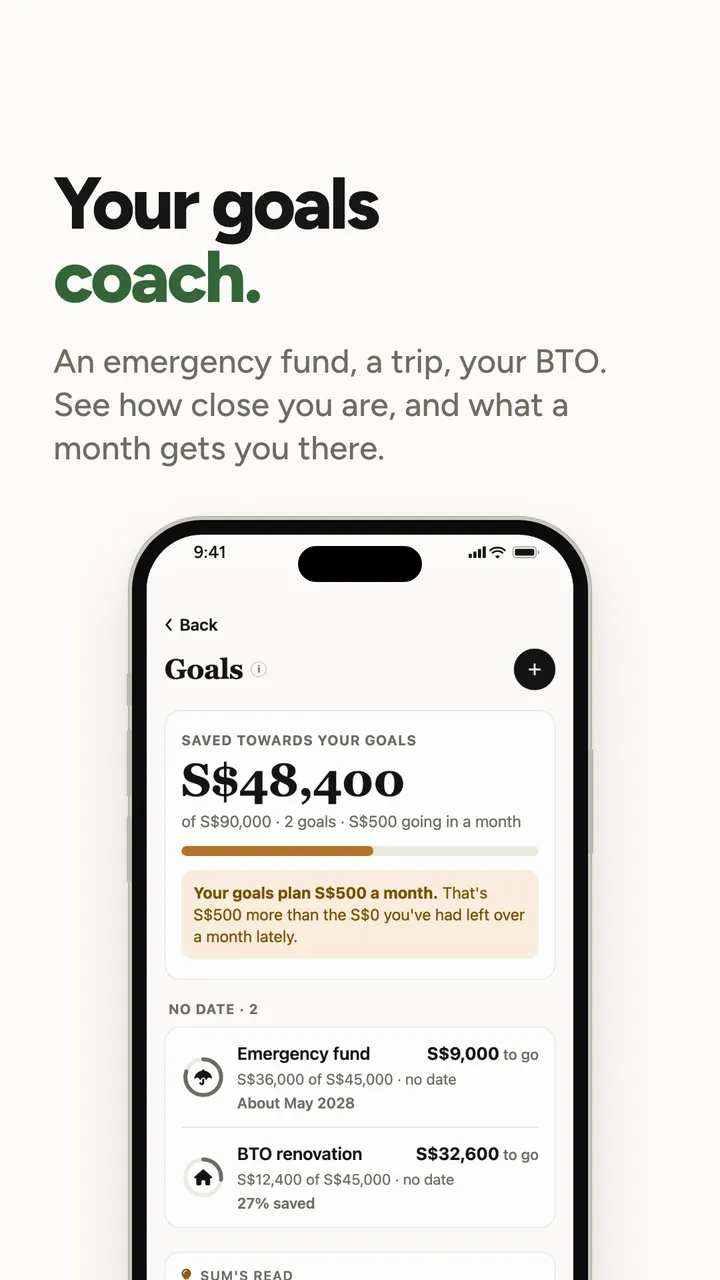
A goal in Sum is a number with a name: an emergency fund, a trip, your BTO renovation. You say how much, how much you've saved already and, if you like, by when. Sum tracks how close you are and what each month gets you.
On the slide (sample data), two goals have $48,400 saved of $90,000 between them, with $500 a month going in. The emergency fund is at $36,000 of $45,000, so $9,000 to go. At $500 a month that's $9,000 divided by $500, which is 18 months. From November 2026, 18 months lands in May 2028, which is the "About May 2028" under it. The BTO renovation is $12,400 of $45,000: $12,400 divided by $45,000 is 27.6%, shown as 27% saved.
Why I call it a coach
A coach doesn't just tell you the score. It tells you the pace. Look at the note at the top of that screen: the goals plan $500 a month, and in this sample that's more than has actually been left over each month lately. That's the kind of thing a good coach says out loud. A plan that needs money you don't have left over isn't a plan yet. You either find the $500 in your budgets, or you move the date.
I keep a three-month emergency fund in a separate savings account (its app isn't on my home screen, on purpose), and I have a goal in Sum for a Japan trip my mum keeps asking about. The goals are the reason I open the budgets screen at all. "Spend less on groceries" never got me anywhere. "Spend less on groceries so the Japan goal lands in time" did.
What this means for you
Give every goal a number. "Save more" leaves you guessing; "$9,000 more for the emergency fund" tells you exactly what a month has to do. Then check that monthly amount against what you've actually had left over, not what you hope to have.
Goals are on the free plan.
Job three: your financial check-up
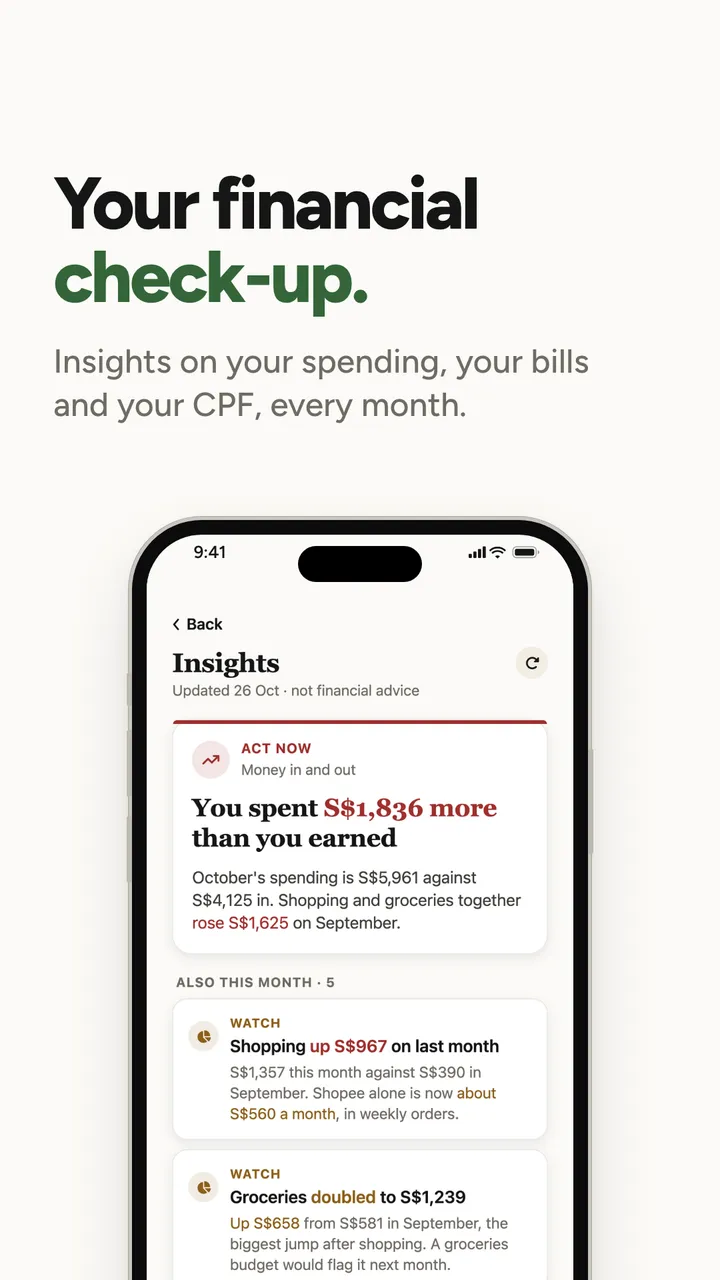
Once a month, Insights looks through your own numbers, your spending, your bills and your CPF, and points out what changed and what's worth a look. Part of my day job is working with the developers on these, so I'm a little biased.
The top card on the slide (sample data) says: you spent $1,836 more than you earned. Here's where that comes from. October's spending was $5,961 and $4,125 came in. $5,961 minus $4,125 is $1,836. The next card explains a big part of it: shopping was $1,357 against $390 the month before, which is $967 more.
Your CPF, as a percentage of a goal
One of the cards on that screen is about CPF: $79,600 of the 2026 Full Retirement Sum of $220,400 in place.
Here's what that means. When you turn 55, CPF opens a Retirement Account for you and moves savings into it, from your Special Account first and then your Ordinary Account. The amount it sets aside is measured against reference figures called retirement sums. For members turning 55 in 2026, CPF Board puts the Full Retirement Sum at $220,400. It isn't a bill you have to pay; it's a reference point for how much would fund your monthly payouts from 65.
So $79,600 of $220,400 is about 36% of the way, with $220,400 minus $79,600, which is $140,800, still to go.
"A lot" doesn't tell you anything about a CPF balance. "A third of the way, with 20-odd years to go" does, and it's a lot calmer to look at.
What a check-up is, and isn't
It's a check-up, the way a health screening is: it tells you what the numbers say and where to look. It doesn't tell you what to buy or where to put your money. That's a decision for you, and for a licensed adviser if you want one.
Insights is on the Pro plan. The CPF summary and your progress to the retirement sum are on the free plan, and our CPF calculator works without an account.
Job four: your bill reminder
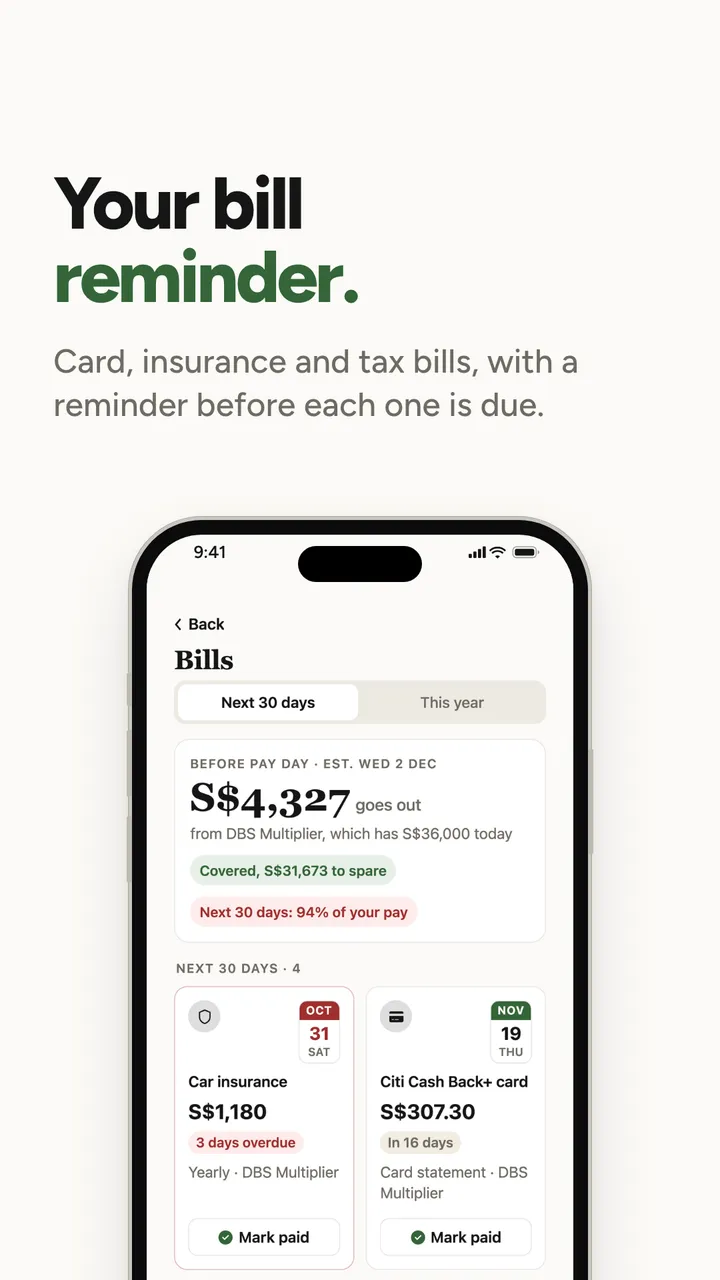
Card bills are monthly, so you get into a rhythm. The dangerous ones are the bills that come once or twice a year: insurance premiums, the yearly Integrated Shield renewal, property tax, income tax if you don't pay by GIRO, a road tax renewal. They're big, they're rare, and they arrive exactly when you've forgotten they exist.
The sample on the slide shows exactly that: the bill that's late is the car insurance, a yearly one, 3 days overdue.
The top of that screen does one more sum. $4,327 of bills go out before the next pay day, from an account that has $36,000 today. $36,000 minus $4,327 is $31,673, so the bills are covered with that much to spare. If the account couldn't cover them, it would say so, before pay day rather than after.
How I handle it now
My system used to be "the bank will send an SMS". The bank does, for its own card. It doesn't remind you about your insurance with a different company, or your tax, or the other bank's card. Sum keeps every bill in one list and reminds you before each one is due, across all your banks. Bill reminders are on the free plan.
What this means for you
Spend ten minutes writing down every bill you pay in a year, not just the monthly ones. When we counted them for an example Singapore household built from national averages, we got to 13. The yearly ones are the ones to put reminders on.
Job five: your accountant
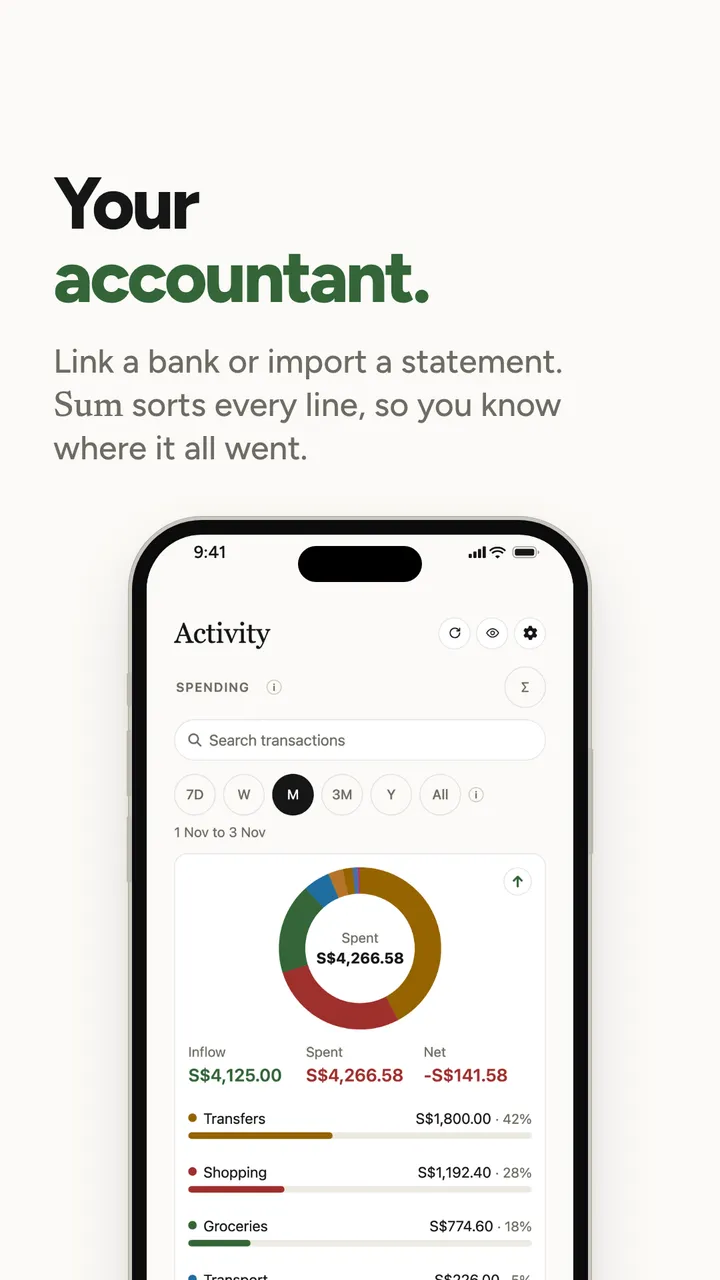
Not an accountant in the chartered sense: nobody is filing your taxes. I mean the part of the job where every receipt ends up in the right column.
There are two ways to get your spending into Sum. You can link a bank so its transactions come in on their own, or you can drop in a statement, PDF or CSV, from your bank or card. Sum reads it and sorts every line into a category: food, transport, groceries, shopping, travel and so on.
The Activity screen on the slide (sample data) is what comes out the other end. $4,125 came in and $4,266.58 went out, so the month ended $141.58 behind: $4,266.58 minus $4,125. Below that, every category with its share: transfers 42%, shopping 28%, groceries 18%, and so on down.
What a statement actually tells you
The first time I imported a full month of my main card, it had 63 lines. Skimming the PDF, my gut said I mostly spend on food and transport. Once it was sorted, food was indeed the biggest category, but the surprise was the third one: lots of small online orders, each under $20, that I genuinely didn't remember. Together they were more than my monthly phone and internet bills combined.
That's the point of sorting. Big purchases you remember. It's the small, frequent ones that disappear, and you only see them when they're grouped.
What this means for you
Try this tonight, with or without an app: open last month's card statement, and add up just one category, say food delivery. Whatever number you get, it's almost always higher than your guess. Knowing the real number is the first step to deciding whether you're fine with it.
What's free, and what isn't
I'd rather be upfront. Sum is free to start.
The free plan covers your net worth across banks, cards, CPF and loans; linking up to two banks; statement and screenshot imports; spending by category; budgets, goals and bill reminders; the card optimiser; and your CPF summary with retirement sum progress.
The paid plans add things like pulling in your CPF and HDB details automatically, the CPF planner and projections, the tax relief optimiser, stocks and crypto in your net worth and, on Pro, Insights. You don't need any of them to get your picture.
If you only remember three things
- Your net worth is what you have minus what you owe, and in Singapore that has to include your CPF and your flat, or it isn't your number.
- A limit per category and a goal with a number tell you more than "spend less" and "save more" ever will.
- The small, frequent spending and the once-a-year bills are where money leaks. Sorting your statements and keeping every bill in one list stops most of it.
How I keep track of this now
These days I don't do the CNY spreadsheet. I open Sum on the first of the month, import last month's card statement, look at the three biggest categories, check the groceries budget and the goals, and glance at the net worth line. About ten minutes, usually with a kopi.
My aunties still ask. But now I actually know the answer, even if I still say "enough lah".
If there's a topic you want explained properly, email me at [email protected]. I read every one.
Talk soon, Brandon
Try the numbers yourself

Sum is launching in Singapore soon.
Your banks, cards, CPF and HDB flat, added up into one net worth. Statements sorted, card caps tracked, bills remembered.
Brandon · Finance team, Sum
Brandon is on Sum's finance team in Singapore. Brandon reads the CPF Board, IRAS and MAS updates so you don't have to, and turns our carousels into the longer version. Questions, corrections or something to share? Email Brandon at [email protected].
Got something interesting to share?
A money story, a question, something we got wrong, or a tip other Singaporeans should hear. Reach out to me at [email protected], or leave your email and I'll write to you.
Sources: SingStat, Household Sector Balance Sheet, 2Q 2026; CPF Board, Your complete guide to retirement planning in Singapore.
Any app screens shown use sample data, not a real person's. Sum is free to start; some features need a paid plan.